Create Rounded Corners on Image Online
Make round corners or turn your images into a circle in 1 click online for free. Adjust radius and apply Bevel and Emboss effect for 3D looking image.
Use the Rounded Corners slider to create rounded edges on your photos. The slider goes from 0 pixels to a maximum of 250 pixels, where the image becomes a perfect circle. Download your result in the same resolution and quality as your original image as a PNG or WEBP with transparent corners, or JPG with non-transparent corners, then paint the background with our Paint Bucket Online Free Tool.
Bevel and Emboss Feature for 3D Effect
Make your image 3D with the Bevel and Emboss function and set up the light source. Our Rounded Corners, Bevel and Emboss Image Online Tool also includes an option to make your image 3D, making it look like it has thickness—just like a button on a keyboard. It creates a frame of light and shadow along the edges and corners while the center remains flat. This makes the shape look like a 3D block or a physical button.
There are two modes for the bevel and emboss effect:
-
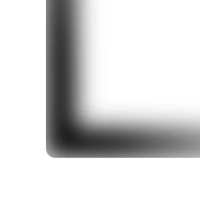 Smooth: This mode makes the transition between the flat part of the image and the beveled edge flow gradually for a soft, rounded look.
-
 Chisel: This creates a sharp, clearly visible edge between the flat surface and the bevel, giving it a hard, "carved" appearance.